
URL rewrite module fully utilizes extensibility of IIS 7.0 configuration system. The rewrite rules are stored in applicationHost.config and web.config files in XML format. This provides a huge benefit of being able to use rich set of IIS 7.0 management tools and API’s for managing and scripting URL rewriter configuration. For example, you can automate any configuration task, including creating, editing and deleting of rewrite rules, by:
- writing .NET code that uses Microsoft.Web.Administration API’s;
- writing JavaScript code;
- using IIS command line tool appcmd.exe;
- using PowerShell provider.
The Configuration Editor, included in the Administration Pack for IIS 7.0, greatly simplifies the process of generating scripts for automating URL rewriter configuration. In this post, I will demonstrate how to use the Configuration Editor to automate configuration of rewrite rules.
Let’s assume that we want to automate the process of creating a rewrite rule for “Default Web Site”. The rule that we want to use looks like this:
<rule name="MyRule">
  <match url="[some url pattern]" />
  <action type="Rewrite" url="[some substitution url]" />
</rule>
where [some url pattern] and [some substitution url] will be the parameters set by the script.
In IIS manager,select “Default Web Site” and launch the Configuration Editor:
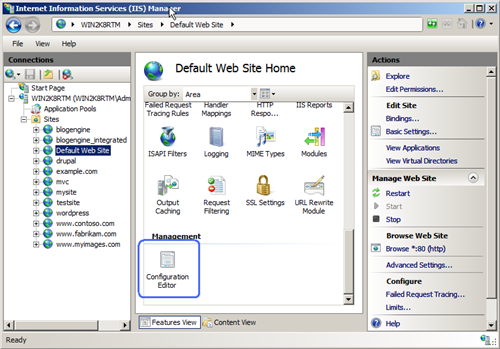
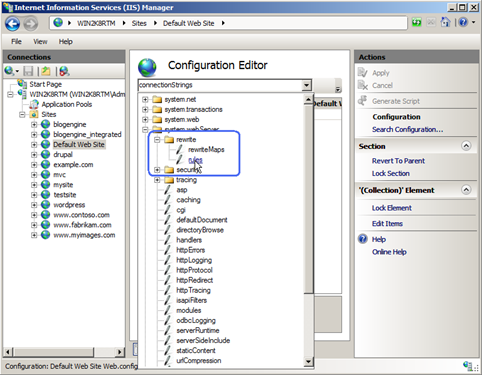
Once in the Configuration Editor feature view UI, use the drop down list to select the “rules” configuration element, located under “system.webServer/rewrite”:
After the selection has been made, click browse button to launch the Collection Editor:
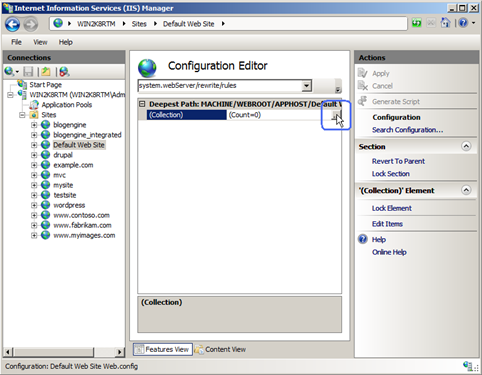
Inside the Collection Editor, click “Add” and then enter the rule configuration:
- name: MyRule
- match/url: foo\.htm
- action/type: Rewrite
- action/url: bar.htm

Close the Collection Editor and then click “Generate Script” action:

This will bring up a script dialog that will contain auto-generated C# and JavaScript code as well as appcmd commands:
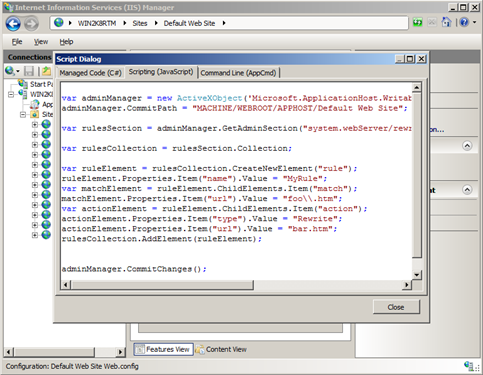
For example, the C# code for creating rewrite rule will look as below:
using System;
using System.Text;
using Microsoft.Web.Administration;

internal static class Sample
{

    private static void Main()
    {

        using (ServerManager serverManager = new ServerManager())
        {
            Configuration config = serverManager.GetWebConfiguration("Default Web Site");

            ConfigurationSection rulesSection = config.GetSection("system.webServer/rewrite/rules");

            ConfigurationElementCollection rulesCollection = rulesSection.GetCollection();

            ConfigurationElement ruleElement = rulesCollection.CreateElement("rule");
            ruleElement["name"] = @"MyRule";

            ConfigurationElement matchElement = ruleElement.GetChildElement("match");
            matchElement["url"] = @"foo\.htm";

            ConfigurationElement actionElement = ruleElement.GetChildElement("action");
            actionElement["type"] = @"Rewrite";
            actionElement["url"] = @"bar.htm";
            rulesCollection.Add(ruleElement);

            serverManager.CommitChanges();
        }
    }
}
Now, you can copy this code into you project and modify it as necessary for your specific configuration tasks. First thing you may want to do is change the bogus pattern and substitution URL’s with some real patterns used by your web application.
ruslany, THanks for your great articles about URL Rewrite in IIS 7.
we had use some url rewrite module in our projects. But we want to immigrate all our projects to new IIS URL module.
We have several type of pages,
Product pages (More Than 10K pages)
Category pages (More Than 1K pages)
Articles pages (More than 30K pages)
Landing pages (More than 100k pages).
Most of the pages has a regex pattern but we articles and landing pages has unique customized URLs.
We need to rewrite rules from our sql server database or from external file.
How can we do that?
Sahin, for the pages with unique URLs you can try using rewrite maps. I have a blog post that explains basic concepts and when to use rewrite maps.
URL Rewrite Module does not currently have capability to read rewrite rules from a database or an external file, but IIS team has heard requests for that and is considering adding this support in future releases.
Where’s the WMI provider? Please don’t tell me we’ll be forced to using the archaic PowerShell or .NET for automation.
(To me, appcmd is the CLI version of Inetmgr and is not an option for automation)
I have a working rewrite rule. C# and JS tabs have a generated script but AppCmd is empty, why?