
This post used to contain PHP code for object-cache.php file. This code has been removed because it is out of date and has bugs. Instead, the latest version of WinCache Object Cache plugin from wordpress.org should be used.
This post explains how to improve performance of WordPress on Windows by using the WinCache Extension 1.1 – Beta for PHP. You probably already know that just by enabling the WinCache extension and without any code changes it is possible to get a significant increase in WordPress performance – this is described in details in PHP on Windows: The WinCache 1.0 Benchmark. But this can be taken even further by using the user cache API’s available in WinCache 1.1 release.
To configure WordPress to use WinCache user cache API’s download the WinCache Object Cache Backend plugin, extract the object-cache.php file from it and put it in the /wp-content/ directory of your WordPress site.
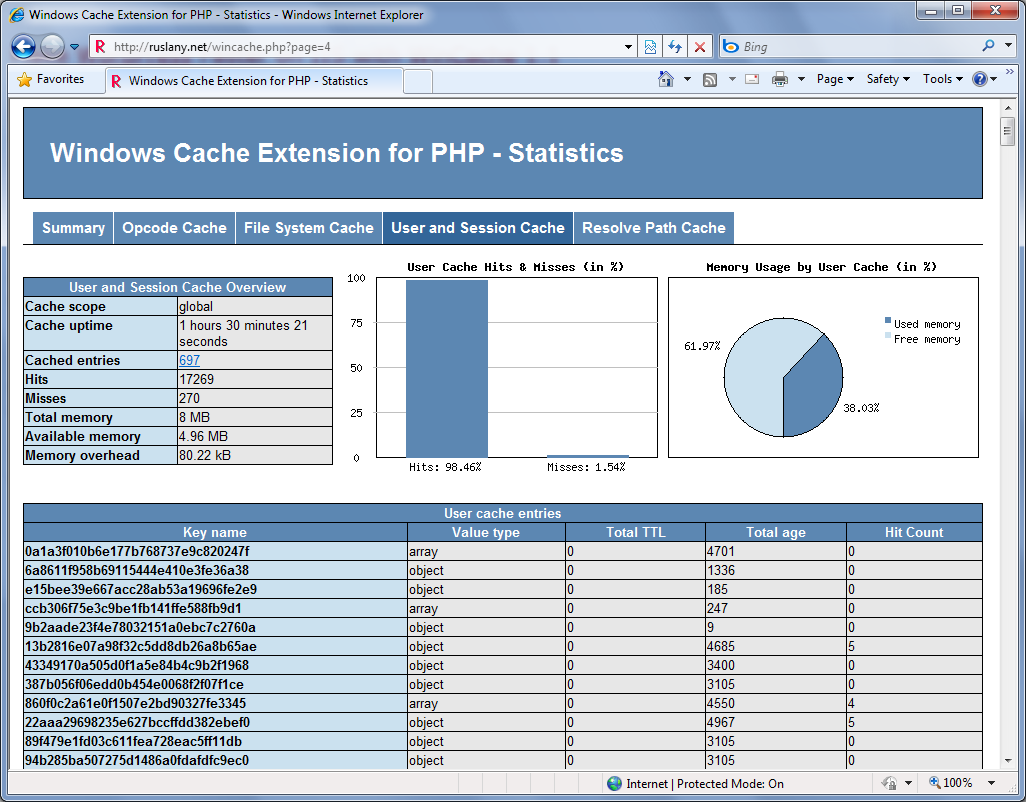
That should be all you need to do. To verify that the WordPress is actually using the object cache use the WinCache Statistics Script and check the “User and Session Cache” page:
Odd problem with this, when i enable this it caches i see it working good, but my plugins page after installing or deleting a plugin still shows/doesnt show the plugin i just modified, is their a way to fix this?
@Chris: this looks like a side effect or a bug in the object cache implementation in wordpress. I am not aware of an easy way to fix this. I suspect that the plugins page will show correct information once the cached data has expired or the IIS worker process recycles.
ya but its driving me nuts lol, i install plugin, have to recycle the pool, then the plugin page updates LOL, any ideas on a workaround, i love it it makes the site really fly but getting things up and running is a beast with this, i guess i cud disable the cache-object every time i want to do plugin or admin maintenance but thats also kinda dificult, wish their was an easy way to disable and enable it lol
hey ruslany, can you post the code u used for that wincache stats on the right?
wud be cool to have that in the dashboard widgets.
@Chris: here it is:
<?php if ( function_exists('wincache_ocache_fileinfo') ) : ?><li>
<h2>WinCache</h2>
<div id="wincache">
<ul>
<?php $wincache_stats = wincache_ocache_fileinfo(); ?>
<li class="noimage"><strong><?php echo $wincache_stats['total_file_count']; ?></strong> cached PHP files</li>
<li class="noimage"><strong><?php echo $wincache_stats['total_hit_count']; ?></strong> cache hits</li>
<li class="noimage"><strong><?php echo $wincache_stats['total_miss_count']; ?></strong> cache misses</li>
<li class="noimage"><a href="http://ruslany.net/2010/03/more-performance-improvements-in-wincache-1-1-beta/">Learn More...</a></li>
</ul>
</div>
</li>
<?php endif; ?>
What is with the enablecache=treu setting in wp-config.php
Must this flag be true when using the api?
@Manuel: I am not sure how that flag relates to this. For example I set it to true and to false and it did not make a difference for me. Currently on my site I have it set to false and the object cache works fine.
Hi, wincache is really very cool, but one issue I am seeing when I enable the object cache is the pending comments count (and also the plugin count) in the wordpress admin do not update.
I remember there was the same issue with wordpress 2.7.1 and an opcode object cache we were using at the time, and it eventually got fixed (it was working fine for us with eaccelerator opcode cache)
Any chance this could be fixed for wordpress 2.9.2 and wincache object cache?
Thanks.
Hi Mmos, when it worked for you on 2.7.1 – did you use exact same code for the object-cache.php as in here? I also noticed that the plugin count does not get updated. Apparently all the items that wordpress puts into the the cache do not expire. But I did not know that it was different in 2.7.1.
Hi, we were using the one from this site:
http://neosmart.net/dl.php?id=12
it can be downloaded here:
http://neosmart.net/downloads/software/WordPress/Plugins/object-cache/xcache-object-cache_0.6.zip
Also that version worked with both 2.7.1 and 2.9.2 for us.
Hi, any update on getting the object cache to work with wordpress?
Also was just wondering, if wincache’s user cache is enabled (vide object-cache) in wordpress, then would you say using a plugin like wp super cache with iis output caching is no longer needed?
Basically my question is does wincache perform as well as iis output caching, or would you still recommend using both?
We’re hosting a site with 12M+ page views per month so I’m trying to squeeze the most out of our wordpress/iis install.
I have opened a wordpress ticket regarding this problem. It looks like this requires change in the WordPress code.
Could you please tell me how to protect “wincache stats php” file with WP admin auth?
And how to integrate wincache stats in admin panel?
Thanks.
Hi Derek, I think this plugin does what you are looking for.
I don’t have a file calles object-cache.php in this directory.
Can i create it with the code posted here and wordpress will use it automatically?
Any side effects?
To Replay my own Message:
Just create the file, it will be used if it’s there.
Hi Manuel, yes you are right: just drop the file there and it will be used. I have been using this file on my site for about a year now and the only side effect that I noticed is the plugin count does not get updated – I have opened a wordpress ticket for that. But that in my opinion is a minor problem comparing to a huge benefit in performance that I gain with wordpress object cache.
I think i have found another problem. I am not able to update Plugins / to see the new version after the update.
– I get an information about a about for a plugin
– i click “update it”
– the update starts
After the update i can still see the the old version and “there is a new version” information for some minutes.
Hi Manuel, yes, that is related to the problem that I have reported to the wordpress team: the cached data for plugins is not refreshed after a plugin is updated. Because of that the plugin count is not updated and the plugin is still showing the old version.
Okay, so i can report another issue:
When there are planed posts for the future they are visible as planed but at the selected time they don’t set to visible.
When updating them later they appear on the blog.
Strange issue.
Now that W3-total-cache now supports wincache:
(http://wordpress.org/extend/plugins/w3-total-cache/)
Should your WinCache Object Cache Backend plugin still be used or would this duplicate things?
Thanks
I have not used the w3-total-cache. I will check it out and let you know.
Checked with the w3-total-cache plugin author today. According to him the w3tc provides the superset of the functionality of this plugin, so having them both will duplicate things. I suggest that if you use w3tc plugin then do not use the wincache-object-cache plugin.
WordPress cache plugins like wp-rocket, wp-optimize, and W3TotalCache have all the features provided by WinCache. Microsoft officially dropped support php8 and Wincache for PHP 8 so use plugins.